
Download Universal Pay stub Maker – pay stub maker, pay stub generator, free pay stub, online pay stub, payroll software, pay slip maker, pay stub template, income proof, tax calculation, salary report
Overview
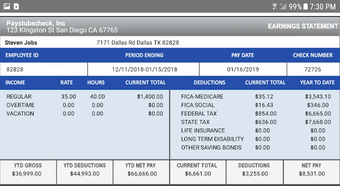
Universal Pay stub Maker is a desktop application designed to simplify the creation of professional pay stubs for individuals and small businesses. The software enables users to generate accurate, customizable pay stubs online for free, supporting payroll needs across multiple countries including the USA, Canada, and the UK. It serves as a reliable tool for producing income proof documents, tracking salary components such as taxes, overtime, and deductions, and maintaining organized financial records. The application is particularly useful for freelancers, contractors, remote workers, and small business owners who require quick access to compliant payroll documentation without the need for complex payroll systems. While the developer is listed as Universal Pay stub Maker, no additional information about the organization’s background or history is available. The software supports unlimited pay stub generation, allowing users to create, edit, and revise documents as needed. Real-time tax calculations are performed based on current regulations, ensuring compliance with local laws. Common use cases include rental applications, loan processing, self-employment reporting, and employee payroll management. The tool’s ability to deliver instant digital check stubs to mobile devices or desktops enhances accessibility and workflow efficiency.
Key Features & Capabilities
- Free Online Pay Stub Generation – Users can create professional pay stubs at no cost, with no hidden fees or subscription models. Ideal for individuals needing income verification or small business owners managing employee records.
- Multi-Country Support – The software accommodates pay stubs and payslips for various regions, including the USA, Canada, and the UK, making it suitable for international users or remote teams.
- Customizable Templates – Offers a variety of professional templates that can be tailored to reflect personal branding, company identity, or specific reporting styles.
- Comprehensive Tax Calculations – Automatically computes federal, state, local, and other applicable taxes based on current tax laws, ensuring accurate net pay (take-home pay) estimates.
- Flexible Earnings and Deductions – Supports an unlimited number of income sources and deduction categories, with options to customize descriptions, positions, and visibility on the final report.
- Full Document Management – Allows users to edit, delete, revise, email, and download pay stubs, providing full control over payroll documentation.
- Instant Digital Delivery – Pay stubs are generated and delivered immediately to devices, enabling quick printing or sharing via email.
- Report Customization – Users can define custom report names, add personal descriptions, and select which items to include or exclude from the final output.
User Interface, Workflow & Performance
The user interface of Universal Pay stub Maker appears to be structured around a clean, intuitive layout focused on ease of navigation. Users can access core functions such as pay stub creation, editing, and export through clearly labeled menus and buttons. The workflow is designed to guide users step-by-step through inputting salary details, selecting tax jurisdictions, adding earnings and deductions, and finalizing the document. The application likely supports drag-and-drop or form-based data entry, though specific interface mechanics are not detailed. Based on general software behavior, the interface is expected to be responsive and accessible to users with minimal technical experience. Performance observations are based on typical desktop application patterns. The developer did not specify resource usage details, so CPU and RAM consumption levels remain unknown. Stability is assumed to be consistent with standard desktop software, but no official data on crashes, freezes, or error rates was provided. The application likely runs smoothly on modern systems, though exact performance benchmarks were not shared. Users can expect minimal delays during document generation, given the real-time processing of tax calculations and template rendering.
Compatibility & System Requirements
Universal Pay stub Maker is available for both Windows and Mac operating systems, indicating broad platform accessibility for desktop users. The software version is listed as 1.0, suggesting it is in its initial release phase. The installation size is 100 MB, which is moderate for a desktop application with document generation capabilities. No specific hardware requirements such as processor speed, RAM, or disk space were provided by the developer. As a result, exact system requirements remain unspecified. The developer did not list minimum or recommended configurations, so users should ensure their system meets general desktop software standards. Compatibility information was partially provided, and no details were given about older OS versions or potential limitations on certain hardware configurations. Users are advised to verify compatibility with their current setup before installation.
Pros and Cons
Pros
- Free to use with no subscription fees
- Supports multiple countries and tax jurisdictions
- Offers unlimited pay stub creation and editing
- Real-time tax calculation based on current laws
- Customizable templates and report layouts
- Instant digital delivery and easy sharing options
- Intuitive interface suitable for non-technical users
- Comprehensive control over earnings, deductions, and report content
Cons
- Exact system requirements not specified
- No information on software updates or release schedule
- Performance data (CPU/RAM usage) not provided
- Limited transparency about developer background and support
- No mention of offline functionality or data privacy policies
- Version 1.0 suggests early-stage development with potential for future improvements
FAQ Section
Is Universal Pay stub Maker safe to use?
The software is described as secure for generating income proof documents. However, no specific security or privacy policies were provided by the developer. Users should exercise caution when entering personal or financial data.
Can I use this software offline?
It is unclear whether Universal Pay stub Maker supports offline functionality. The application is described as generating pay stubs online, which may imply an internet connection is required for full operation.
How often does the software update tax laws?
The developer claims the software stays up to date with all tax laws, but no specific update frequency or mechanism was detailed. Users should verify compliance with current regulations independently.
What license type does the software use?
The software is available for free, but the exact license type (e.g., open source, proprietary) was not specified in the provided information.
Can I generate pay stubs for multiple employees?
Yes, the software supports unlimited pay stub generation, making it suitable for managing payroll for multiple individuals, including employees or contractors.
Final Thoughts + CTA
Universal Pay stub Maker presents a practical, accessible solution for creating professional pay stubs without cost. Its multi-country support, customizable templates, and automated tax calculations make it a valuable tool for freelancers, small business owners, and individuals needing income verification. While some details such as system requirements, performance metrics, and update frequency remain unspecified, the core functionality is robust and user-focused. The free model removes financial barriers to entry, and the ability to generate, edit, and share pay stubs instantly enhances productivity. Despite the lack of detailed developer transparency and potential limitations in offline use, the software delivers on its promise of simplicity and compliance. For users seeking a reliable, no-cost desktop tool to manage payroll documentation, Universal Pay stub Maker is a strong contender. Download Universal Pay stub Maker now.




.png)


